

Good Posture Starts with the Right Support
Good posture isn't about sitting perfectly still. It's about finding the right support for your body, your workspace, and the way you naturally move throughout the day.
Your Sitting Posture May Be Working Against You

Leaning toward the screen can pull the head forward and round the shoulders. Over time, this unbalanced position may make it harder to maintain a relaxed, upright posture.

When the head moves forward or tilts downward, the neck muscles have to work harder to support it. This can leave the neck feeling tired, stiff, or uncomfortable.

When the arms are unsupported or the desk is too high, the shoulders may lift and remain tense. Proper arm support helps the shoulders stay relaxed.

Without enough support behind the lower back, the pelvis may roll backward and the body may begin to slouch. This can increase pressure and fatigue around the lower back.

A seat that is too deep or too high may place pressure behind the thighs and leave the feet unsupported. This can make the hips and legs feel heavy, numb, or uncomfortable.

Physical discomfort can make it harder to stay focused. A better-supported sitting position helps reduce unnecessary distractions throughout the workday.
Take 30 Seconds to Check Your Sitting Posture
Healthy sitting does not mean forcing yourself to sit perfectly straight. It means keeping your body balanced, supported, and relaxed.

Are you leaning or dropping your head forward?
Forward Head Tilt & Neck Muscle Fatigue
To minimize strain on your neck, position your screen so the top of the monitor is at or slightly below eye level. When your gaze is naturally parallel to the floor, your neck muscles don't have to work to keep your head upright. When your head tilts forward, your neck muscles have to support several times the head's actual weight (about 10-12 lbs), which is a primary cause of stiffness and tension headaches.
SIHOO Care Recommendation: We suggest adjusting your monitor height and using our multi-dimensional adjustable headrest. Position the headrest so it fits snugly into the natural curve at the base of your skull. This allows the headrest to absorb the weight of your head, guiding your cervical spine back into its relaxed, neutral alignment.


Are your shoulders relaxed?
Shrugged Shoulders & Trapezius Muscle Strain
If your desk or armrests are too low or too high, your body instinctively shrugs to compensate, keeping your shoulder and upper back muscles (like the trapezius) under constant strain. For healthy alignment, your elbows should rest comfortably at a 90-to-100-degree angle. Leaving your arms unsupported forces your shoulders to hold up the weight of your limbs, leading to that burning sensation in your upper back.
SIHOO Care Recommendation: By utilizing our multi-dimensional adjustable armrests, you can bring them to the exact height of your desk. This ensures your forearms are fully supported, allowing your shoulders to naturally drop and release built-up tension throughout the day.


Is there a gap behind your lower back?
Lumbar Void & Spinal Slouching
Your spine naturally curves in an "S" shape, but sitting in an unsupportive chair collapses this curve into a "C," placing excessive, uneven pressure on your lumbar discs. To prevent this, your lower back needs continuous, active support. Slouching or leaving a gap between your back and the chair causes your core and lower back muscles to strain continuously just to keep you upright.
SIHOO Care Recommendation: When sitting down, make sure to slide your hips all the way back into the seat pan so your lower back makes full contact with the backrest. Adjust our responsive lumbar support to rest firmly against the small of your back. This system is engineered to hug your lumbar curve even when you shift positions, maintaining pelvic stability and keeping your spine in a relaxed, upright alignment.


Can both feet rest firmly on the floor?
Under-Thigh Compression & Leg Swelling
If a seat pan is too deep or the wrong height, its front edge acts like a physical barrier, pressing against the blood vessels and nerves under your thighs. This restriction in blood flow is what causes leg numbness, cold feet, and swelling by mid-afternoon. Proper ergonomics require your feet to rest flat on the floor with knees bent at roughly 90 degrees, leaving a gap of 2-3 fingers (about 2 inches) between the back of your knees and the edge of the seat.
SIHOO Care Recommendation: Adjust your seat height so your feet rest flat on the floor (or use a footrest), and utilize our seat-depth adjustment function. Combined with our thoughtfully engineered waterfall-edge seat design, this helps distribute your weight evenly, eliminating pressure points and keeping your lower-body circulation unrestricted.


Discover Your Perfect Chair Setup
Answer seven quick questions to find Sihoo chairs suited to your body, sitting habits, and workspace.
How many hours do you sit each day?
Longer sitting makes support, pressure relief, and movement more important.
Feel the Difference
Small adjustments can make a noticeable difference. Better support helps reduce pressure, improve comfort, and make long hours of sitting feel easier.


For Maxis Users
Adjust the Chair to Fit You
Create stable recline support
Where available, increase the recline resistance so the backrest supports your movement with a controlled, stable feel.
Create more space around the body
Adjust the armrests outward or increase the space between them where the chair allows.
Check the seat and support capacity
Choose a chair with an appropriate seat width, frame design, and recommended weight capacity.


What Real Users Are Saying
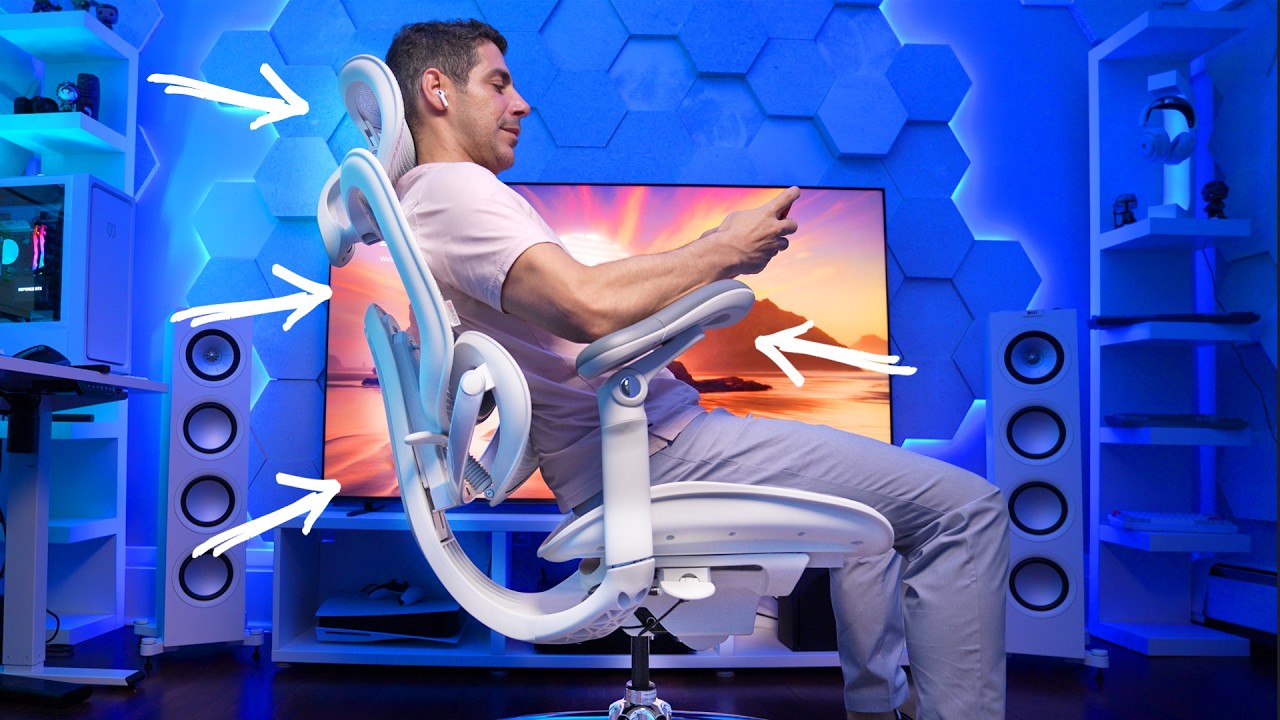
The SihooChair C300 Pro V2 and claims to be the first full-body dynamic ergonomic chair. Meaning that instead of you adjusting to the chair - this thing adjusts to YOU - in real time.

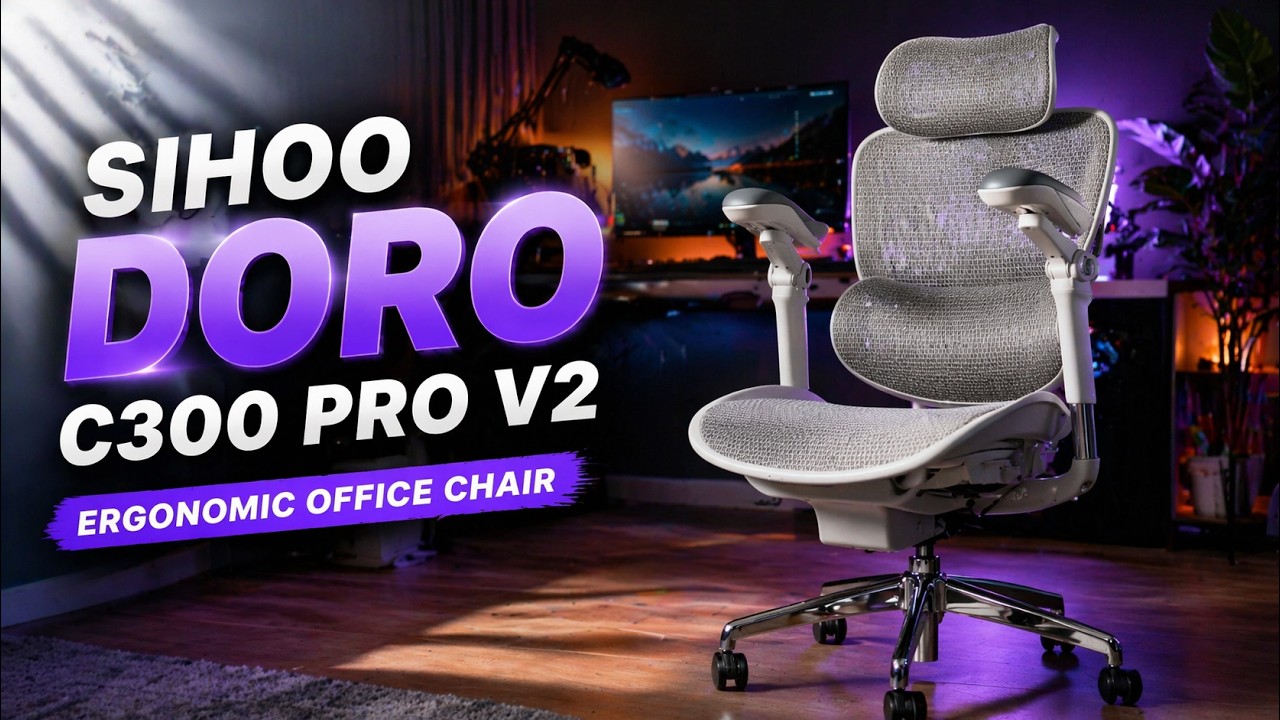
The question here is not is this chair comfortable, but rather does itstay comfortable while you move. Full body adaptive support will help you.

We Are Trusted By...


Frequently Asked Questions
Is there one perfect sitting posture?
Is there one perfect sitting posture?
No. Healthy sitting is about changing positions naturally while keeping your body properly supported throughout the day.
How often should I adjust my sitting position?
How often should I adjust my sitting position?
Even with a well-adjusted chair, changing your posture and standing up regularly can help improve comfort during long periods of sitting.
How do I know if my chair fits me?
How do I know if my chair fits me?
A chair fits well when your feet rest comfortably on the floor, your lower back is supported, your shoulders stay relaxed, and your arms can rest naturally while working.